Artevak: Mastering Tribal Tattoo Typography Without the Typical Mistakes
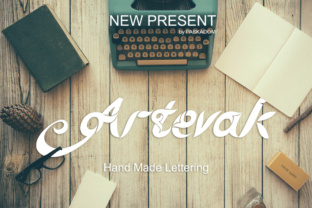
Picture a design that grabs attention instantly. Its edges are sharp, its patterns interwoven, and it carries the weight of ancient traditions conveyed through ink. That is the power of Artevak, a modern digital typeface inspired by the bold geometry of tribal tattoo art. It offers an energy and raw aesthetic that standard fonts simply cannot match. However, a specialized tool like Artevak requires a thoughtful hand. Jumping in without understanding its strengths and quirks often leads to muddy layouts, legibility nightmares, or projects that miss the mark entirely. To help you wield this typeface like a seasoned professional, let's break down the common pitfalls and, more importantly, how to avoid them entirely.
The Size Trap: Why Tribal Fonts Demand Room to Work
The single most frequent error we see is Artevak being used at small, secondary sizes. The intricate strokes and signature "needle" details that make this tribal style so compelling are designed to be seen and appreciated. When you scale it down to fit a subheading, caption, or footnote, those delicate lines bleed together. What looks like a masterpiece at 72 points can become an illegible blur at 12 points, completely destroying the crisp contrast that defines the look.
A Better Approach: Treat Artevak as a high-impact display font. It belongs in headlines, hero sections, logos, and short, powerful phrases. Reserve it for the elements that need the most visual weight. For body text, labels, or any secondary information, pair it with a clean, minimalist sans-serif like Montserrat, Lato, or Open Sans. This contrast creates a clear visual hierarchy where the tribal elements command attention without sacrificing readability. Your audience should see the tribal detail, not struggle to decipher it.
Context is Everything: The Brand Fit Factor
Artevak inherits a deep cultural and stylistic legacy rooted in tattoo traditions from around the world. It evokes strength, heritage, and an undeniable edge. Using it in the wrong context doesn't just look odd—it can actively confuse your message or feel visually insensitive. Placing this font on a soft, corporate brochure or a children's birthday invitation creates a jarring disconnect that undermines your entire project.
Choosing Wisely: Before you use Artevak, ask yourself: Does the core identity of my project align with the attributes of tribal art—strength, permanence, rebellion, or intricate detail? It is a natural fit for fitness brands, motorcycle clubs, fantasy game titles, metal band posters, extreme sports apparel, and anything directly related to tattoo culture. If your brand is soft, minimalist, or corporate, Artevak will likely overpower it. In that case, look for typefaces that share DNA with your brand voice. When the context is right, the font becomes a powerful ally. When it's not, it becomes an unintentional distraction.
Smart Font Pairing Strategies
Once you've confirmed the context is right, you need a partner font that supports, rather than competes with, Artevak. Since it is a decorative, high-contrast typeface, it needs a neutral, steady companion.
- Sans-Serif Minimalists: Fonts like Montserrat, Proxima Nova, or Roboto. Their uniformity and clean lines contrast beautifully with the organic flow of tribal shapes.
- Geometric Fonts: Futura or Century Gothic. Their precise geometry echoes the structured angles found in many tribal patterns.
- Simple Slab Serifs (Use with Caution): A clean slab like Roboto Slab can work for a rugged feel, but keep it very plain to avoid visual noise.
What to Avoid: Pairing Artevak with other decorative scripts, grunge textures, calligraphy, or ornate serifs. This creates chaos. Let Artevak be the star, and let everything else get out of its way.
The Art of Letting Breathe: Negative Space
This is a technical nuance that separates good design from great design. Tribal fonts are not defined solely by the black ink; they are equally defined by the shapes carved out by the white space. When you crowd Artevak with busy backgrounds, competing textures, or too many other graphical elements, you suffocate the design. The intricate patterns lose their definition, and the overall impact is flattened.
Practical Tip: Give Artevak generous room to work. Increase your margins. On a poster or flyer, don't be afraid of blank space around the headline. Place the text on a solid, high-contrast background. A pure black Artevak on a clean white field (or white on black) allows the geometry to speak for itself. Think of it like an actual tattoo: the skin (negative space) is an integral part of the artwork. Respect that space, and your design will look cleaner and more professional.
File Quality and Licensing: The Hidden Cost of "Free"
The internet is flooded with free tribal fonts, but they often come with steep hidden costs. Poor kerning, missing characters, a lack of OpenType features, and restrictive licenses are common with knock-off versions. Using a poorly coded or pirated version of a font like Artevak introduces serious risk into your workflow.
Why This Hurts Your Project: Imagine printing 500 t-shirts or finalizing a website only to find that the letter "R" is awkwardly spaced, or the file doesn't render in your embroidery software. You waste time, money, and reputation. A high-quality project relies on high-quality assets.
The Solution: Purchase Artevak from a reputable type foundry or marketplace. Ensure it comes in reliable formats like OTF (OpenType) for print and WOFF2 for the web. Check the license to confirm it covers your specific use case, whether commercial or personal. Investing in the legitimate font file is an investment in the stability and success of your final product.
The Hidden Toolkit: Unlocking Glyphs and Alternates
A surprisingly common oversight, even among experienced creators, is failing to explore the full character set. Professional typefaces like Artevak often include stylistic alternates, ligatures, and contextual swashes. You might be typing "TRIBE" using only the default letters, completely missing a swash version of the "T" or a special connecting "R" that makes the word flow like a single, cohesive tribal band.
How to Level Up: Open the Glyphs panel in your design software (Adobe Illustrator, Photoshop, or even Canva's character map). Scroll through the available characters. Swap out default letters for their alternates. This is how you customize the look and ensure your design doesn't look like a generic template. It adds a layer of craftsmanship that clients and audiences will subconsciously recognize as high-quality work.
Real-World Testing: Before You Hit "Print" or "Publish"
One final pitfall is applying Artevak to a mockup without testing the physical or digital application. A font looks very different on a glowing retina screen compared to a matte printed poster or a textured t-shirt. The fine lines of the tribal style might get lost depending on the medium.
Checklist for Final Approval:
- Print Test: Print a sample at the actual size on the intended material. Check that the fine lines don't break up or bleed into each other.
- Web Test: Preview the type on different browsers and devices. Ensure the font loads correctly and the sizing is responsive.
- Color Contrast: Ensure the contrast ratio is high enough for the tribal shapes to remain distinct, particularly on dark or textured backgrounds.
Case in Point: A local gym rebranded using Artevak for its name, "IRON FORGE." Initially, they placed the text over a busy image of gym equipment. It looked cluttered and the name was hard to read. By switching to a solid charcoal background and increasing the letter spacing, the name immediately became powerful and clear. They paired it with a light Montserrat for the tagline, creating a cohesive brand identity that communicated strength without clutter.
Artevak is an exceptional tool for bringing bold, primal energy to your work. By respecting its need for size, space, and context—and by investing in the proper files and exploring its hidden features—you will sidestep the amateur mistakes that dilute its impact. Treat this typeface with the strategy it deserves, and you will create designs that are not only visually stunning but functionally effective. Go make something bold.