Violeta: Why This Modern Calligraphy Typeface Deserves a Closer Look
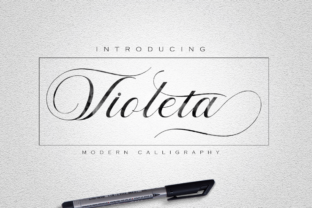
Choosing a typeface can feel deceptively simple. You scroll through a gallery, spot something elegant, and make a quick purchase. But if you have spent any time working on branding, invitations, or digital content, you already know that a font’s value goes far beyond its initial appearance. Violeta is a lovely modern calligraphy typeface that combines classic calligraphy with a modern style, and at first glance it looks like a straightforward choice. However, there are several overlooked aspects that can make the difference between a polished result and one that feels flat or mismatched. Understanding what Violeta actually offers, and what it does not, will save you time, money, and creative frustration.
The Mistake of Treating All Calligraphy Fonts as Interchangeable
It is tempting to group every script font into the same mental category. They all have loops, swashes, and a handwritten feel, so how different can they really be? The answer is that the differences matter enormously in practice. Violeta stands out because it is built around 500 unique hand-drawn glyphs. That is not a trivial number. Many calligraphy fonts offer a single character set with a handful of alternates, forcing you to rely on OpenType features that may or may not work in your software. Violeta gives you genuine variety out of the box.
The practical consequence is that your text avoids the repetitive look that plagues lesser fonts. When you write a word like “flourish” with Violeta, each letter can take a slightly different form, creating a rhythm that mimics real handwriting. If you choose a font with fewer glyphs, the same word can look mechanical after the first use. For anyone designing logos, wedding invitations, or social media headers, that natural flow is not a luxury—it is the entire point.
Overlooking the Value of Alternate Characters
Another common misunderstanding involves alternate characters. Many users assume alternates are merely decorative extras that you add manually one by one. While that is one way to use them, Violeta’s alternate set is designed to work as a system. You can program stylistic sets in applications like Adobe InDesign, Illustrator, or Affinity Publisher, and the font will automatically substitute certain letters based on context.
The mistake people make is either ignoring alternates entirely or using them randomly. A better approach is to preview how the font behaves with different settings. For example, you might enable stylistic set 1 for a more casual look and stylistic set 2 for a refined, formal finish. Testing these variations before finalizing your design prevents the awkward situation where a letterform clashes with the surrounding characters. Violeta’s alternates are not just ornaments—they are tools for matching the tone of your project.
Using Violeta Without Considering Its Best Applications
No typeface works everywhere, and Violeta is no exception. Its modern calligraphy style shines in display settings—headlines, titles, short quotes, branding marks, and product labels. Where it tends to underperform is in long body text. The hand-drawn aesthetic, while beautiful, becomes tiring to read in paragraphs. That is not a flaw; it is a design constraint that savvy users anticipate.
The corrective step is to pair Violeta with a neutral, readable companion font. A clean sans-serif like Open Sans, Lato, or even a classic serif like Garamond creates contrast and gives the eye a place to rest. When you use Violeta for a heading and a simpler font for the body, both elements gain impact. The calligraphy becomes a deliberate accent rather than a wallpaper of loops.
A realistic example: a small business owner designing a product label might set the brand name in Violeta and the ingredient list in a lightweight sans-serif. That choice communicates elegance without sacrificing readability. The same principle applies to blog headers, social media posts, and digital invitations. Know where Violeta belongs, and reserve it for those spots.
Downloading or Buying Without Checking File Format and Licensing
This is the mistake that causes the most frustration downstream. Violeta is available in common formats like OTF and TTF, but not every retailer offers the same package. Some vendors include only the basic character set, while others provide the full 500-glyph version with all alternates. If you purchase a stripped-down version, you lose the very feature that makes Violeta special.
Before you click buy, confirm the following: does the listing specify the glyph count? Does it mention OpenType features or stylistic sets? Is the license appropriate for your use case—personal, commercial, or web? For example, if you are a freelancer designing logos for clients, you need a commercial license that covers the final deliverables. Reading the fine print is not tedious; it is the difference between owning a versatile tool and owning a limited one.
Also, check system compatibility. Violeta works well on both Mac and Windows, but older software versions may not support advanced OpenType features. If you are using a program that does not recognize stylistic sets, you will not be able to access the alternates automatically. In that case, you can still insert them manually via character maps, but the process is slower. Knowing your software’s capabilities ahead of time prevents a last-minute scramble.
Ignoring the Hand-Drawn Nature of Violeta
Because Violeta is digitized, some users treat it as if it were a standard vector font. They stretch it, compress it, or apply heavy effects that distort the organic quality. This is a subtle but persistent mistake. Violeta’s charm comes from the fact that each glyph was drawn by hand, not plotted by an algorithm. When you distort the proportions, you lose the subtle weight variations and irregular edges that make it feel alive.
Better practice: scale Violeta proportionally and avoid extreme transformations. If you need a larger size, increase the point size rather than stretching the text box. If you apply effects like shadows or outlines, keep them light so the underlying letterforms remain clear. The goal is to enhance the handcrafted feel, not to mask it.
Underestimating the Learning Curve for Alternates
Let us be honest: using alternate characters well takes a few extra minutes. That time investment discourages many users, and they end up settling for the default letters. The result is a design that looks fine but does not take advantage of Violeta’s full range. For professionals, that is a missed opportunity to add a custom, bespoke quality to their work.
A practical way to avoid this is to build a simple workflow. Open the font in a character map application or use the Glyphs panel in your design software. Scroll through the alternates and pick a few that fit the mood of your project. Apply them to key words—your client’s name, a product title, or a central phrase. This small step gives your design a distinctive edge without requiring hours of tweaking.
For example, if you are creating a save-the-date card with Violeta, select alternate versions of the first and last letters of the couple’s names. That subtle variation signals care and attention. Recipients may not consciously notice it, but they will feel the difference between a generic script and a typeface that was handled with intention.
Comparing Violeta to the Wrong Typefaces
When evaluating Violeta, it helps to compare it with other modern calligraphy fonts that also offer high glyph counts and stylistic alternates. Comparing it to a basic script font with 200 glyphs is not fair to either typeface—they serve different purposes. Instead, look at fonts in the same category, such as those found in premium foundries that specialize in hand-drawn lettering.
What you will find is that Violeta holds its own in terms of variety and polish. Its letterforms are consistent without being uniform, which is a difficult balance to achieve. The ascenders and descenders are well proportioned, and the baseline is steady. Those qualities matter when you are setting multiple lines of text or aligning a title with other design elements.
The takeaway is straightforward: evaluate Violeta based on what it promises—500 hand-drawn glyphs with modern calligraphy style—and test it in your own projects. A font that looks beautiful in a specimen sheet may behave differently in your layout. Download the trial version if available, set a few sample phrases, and see how it handles kerning, spacing, and alternates before committing.
Making the Final Decision with Confidence
Violeta is not a universal solution, and no typeface is. But when you understand its strengths—its generous glyph set, its hand-drawn authenticity, and its stylistic flexibility—you can use it precisely where it will have the most impact. Avoid the common pitfalls of treating it as a generic script, neglecting alternates, or ignoring software compatibility, and you will get results that feel intentional and polished.
For beginners, this means you can skip the trial-and-error phase that so many designers go through. For professionals, it means adding a reliable tool to your toolkit without second-guessing its capabilities. And for anyone creating content that depends on visual tone, Violeta offers a way to communicate warmth, elegance, and care in a single typeface. Take the time to explore its glyphs, pair it thoughtfully, and let the hand-drawn quality do the work.