Wibble: A Hand-Drawn Serif Font with Wobbly Charm
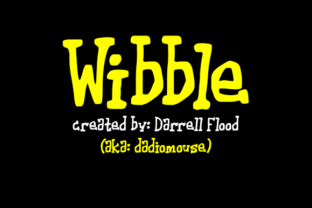
Choosing the right typeface for a cartoon or illustration project often feels like searching for a voice that already exists in your head. You want something that feels alive, imperfect, and full of personality. Wibble, created by Darrell Flood, is a hand-drawn serif font that delivers exactly that: a deliberately wobbly, cute character that brings warmth and motion to static designs. If you have ever struggled to make text feel as playful as the visuals around it, this font may offer a fitting solution.
Wibble stands out because it does not try to be neutral. Every letter carries a handmade quality, with slight variations in stroke weight and baseline that mimic the natural movement of a pen. This gives the font a sense of energy and spontaneity that standard serif or sans-serif fonts rarely achieve. For creators working on comics, children’s books, branding for playful businesses, or social media content that needs to grab attention quickly, Wibble provides a ready-made aesthetic that feels both intentional and carefree.
Why a Wobbly Hand-Drawn Font Matters for Cartoon Work
Cartoons and illustrations thrive on exaggeration, emotion, and visual rhythm. When text appears alongside hand-drawn characters, a rigid, perfectly aligned font can break the illusion. It signals that the text was added later, separate from the artwork. Wibble solves this problem by matching the organic feel of hand-drawn illustrations. Its uneven strokes and gentle wobble make the text feel like it belongs in the same world as the characters.
This integration matters for anyone producing comic strips, animated shorts, or storyboards. Readers subconsciously register the visual consistency between the lettering and the art. When both elements share a handmade quality, the overall piece feels more cohesive. Wibble reduces the need to manually letter each word, saving time without sacrificing the handcrafted look that audiences respond to.
For example, consider a comic panel where a character shouts in surprise. With Wibble, you can set the word “Boom!” in a size that fills the frame, and the font’s natural wobble amplifies the sense of impact. The uneven edges and slight slant add a kinetic quality that a standard bold font would lack. This subtle difference can turn a functional caption into a visual punchline.
Practical Benefits for Creators and Small Business Owners
Wibble is not limited to comic pages. Its personality makes it useful across several real-world applications where tone matters. Small business owners, especially those running cafes, toy stores, or creative services, can use Wibble on signage, menus, or packaging to communicate approachability and fun. A logo set in Wibble immediately signals that the brand does not take itself too seriously, which can help attract a younger or more playful audience.
Marketers and social media managers often struggle to find fonts that work well in thumbnails, stories, and short video captions. Wibble’s hand-drawn quality stands out in feeds dominated by clean sans-serif typefaces. A single word like “Sale” or “New” rendered in Wibble can stop a scroll because it looks different, like something drawn specifically for that moment. This distinctiveness supports brand recognition without requiring elaborate graphic design skills.
Bloggers and content creators who use illustrations or custom graphics alongside their writing will find Wibble helpful for headings, pull quotes, and callout boxes. It adds a layer of personality that text alone cannot convey. For tutorial creators, using Wibble to label steps or highlight key tools can make instructions feel more friendly and less intimidating, especially for younger audiences or beginners.
Who Benefits Most from Using Wibble
Freelance illustrators and independent cartoonists are the most natural audience for Wibble. These professionals often work alone and need tools that speed up their workflow while maintaining a high-quality, handmade finish. Wibble eliminates the need to draw lettering by hand for every project, which can take hours. Instead, they can type the text, adjust the size and spacing, and still retain a hand-lettered look. This efficiency supports more consistent output, especially under tight deadlines.
Educators and homeschooling parents who create learning materials also benefit. Children respond well to fonts that look friendly and less formal. Wibble’s cute wobble can make worksheets, flashcards, and reading materials feel more like a game and less like a test. When a font reduces the perceived effort of reading, learners may engage more willingly.
Hobbyists, such as scrapbookers or digital journal keepers, will appreciate how Wibble adds a hand-crafted aesthetic without requiring any drawing ability. If you enjoy creating themed layouts or character-based diaries, this font can tie your text to your artwork seamlessly. It lowers the barrier to a polished final product, which encourages creative exploration.
Practical Recommendations for Using Wibble Effectively
To get the most out of Wibble, consider the context and scale. This font works best at medium to large sizes where the wobble is clearly visible. At very small sizes, the uneven strokes may become harder to read, especially on screens with low resolution. Reserve Wibble for headlines, short labels, or emphasis rather than long body text. Pair it with a simple, readable sans-serif font for paragraphs to maintain clarity while preserving the playful feel.
Color choice also matters. Wibble’s hand-drawn quality pairs well with bold, flat colors or subtle texture backgrounds. Avoid overcomplicating the background when using this font, because the letters themselves carry enough visual interest. A white or lightly colored background allows the wobble to shine without competition.
When layering Wibble over illustrations, adjust the opacity or add a slight shadow to integrate the text with the art. This technique works especially well for comic panels or poster designs where the text should feel embedded in the scene rather than pasted on top.
Thoughtful Considerations and Limitations
No font works for every situation, and Wibble is no exception. Its hand-drawn aesthetic may not suit formal or professional contexts such as legal documents, corporate reports, or academic presentations. In those settings, the wobble would undermine the seriousness of the content. Likewise, if your project requires maximum readability at small sizes or across long passages, Wibble may not be the best choice. It is a specialty font, designed for a specific tone and purpose.
Another point to consider is licensing. As with any font created by an independent designer, verify the license terms for commercial use. If you plan to use Wibble in products for sale, such as books, merchandise, or branding assets, confirm that your usage falls within the allowed scope. This step protects your work and respects the creator’s rights.
Finally, while Wibble reduces the need for hand lettering, it does not replace the skill entirely. If your project demands highly customized lettering that follows specific character poses or perspective, you may still need to draw some text manually. Wibble serves as a time-saving alternative for situations where standard hand-drawn lettering is sufficient, but it does not promise infinite flexibility.
How Wibble Supports Creative Goals and Efficiency
The real value of any creative tool lies in how much it simplifies your process while improving your output. Wibble accomplishes both by giving you a font that looks hand-drawn but types as quickly as any standard font. This efficiency matters when you are producing multiple pieces of content, experimenting with different layouts, or iterating on a design. You can try different words and placements without redrawing each option.
For entrepreneurs who handle their own marketing, this speed translates directly to more polished content in less time. Instead of spending hours hand-lettering a single poster, you can produce several variations and choose the best one. The freedom to explore options encourages better design decisions because you are not limited by the effort required to produce each version.
Wibble also supports consistency across a series of works. If you are creating a comic series, a set of educational worksheets, or a brand kit for a playful business, using the same typeface throughout ties the pieces together. The wobble becomes a recognizable signature that audiences associate with your style. Over time, this builds visual identity without extra effort.
Final Thoughts on Choosing Wibble
Wibble by Darrell Flood fills a specific niche well. It offers a cute, wobbly, hand-drawn serif aesthetic that suits cartoon work, playful branding, and creative projects where personality matters more than polish. Its strength lies in making text feel like part of the artwork, saving time for creators who need a handmade look without the manual labor.
Before adopting it, consider your project’s tone, scale, and audience. If you need warmth, motion, and a touch of imperfection, Wibble deserves a place in your font library. If your work demands strict formality or tiny text, look elsewhere. Used wisely, this font can elevate your visuals, simplify your workflow, and help your message feel more connected to the imagery it accompanies.