Hello Journal: A Handcrafted Font for Thoughtful Workflows
Typography is often an afterthought in many projects, yet it directly shapes how people perceive and absorb your work. A carefully chosen typeface does not just carry words; it establishes tone, guides attention, and reinforces identity. Hello Journal, a handcrafted font created by Creativeqube, offers a distinct alternative to standard digital fonts. Its hand-drawn quality brings a sense of authentic, human-made warmth to any medium.
This article explores what Hello Journal is and how it fits into a practical, process-oriented workflow. We will examine its integration into creative projects, business materials, and personal routines—focusing on concrete implementation rather than abstract praise.
What Is Hello Journal and Why It Matters in a Process
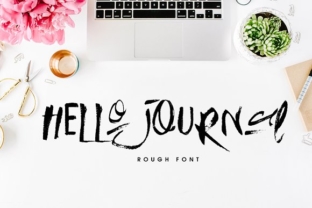
Hello Journal is a handcrafted font that mimics the natural, organic strokes of handwriting. Unlike perfect geometric typefaces, it carries slight irregularities and varying stroke weights that give it a personal, approachable feel. Creativeqube designed this font for those who want to communicate warmth, creativity, and closeness without sacrificing legibility.
In a workflow context, Hello Journal functions as a deliberate design choice that serves specific phases of a project. For example, when you are planning a new campaign or writing a personal goal, the font can set a different mental tone than a neutral sans-serif. Its handcrafted nature signals a human touch before anyone reads a single word.
Because of its distinctive character, Hello Journal is best used for headlines, short-form content, accent text, or branding elements. It is not an all-purpose body font for long documents, but rather a tool for emphasis and emotional alignment. Recognizing this distinction is the first step toward integrating it effectively.
Where Hello Journal Fits in a Broader Creative Workflow
Every project involves several phases: ideation, execution, review, and delivery. Hello Journal can enhance multiple stages if you use it with intention.
- During ideation and planning: Use Hello Journal in mood boards, sketches, and visual brainstorming documents. Its handcrafted look mirrors the raw, unfinished nature of early ideas. This can help you stay in a creative mindset rather than slipping into mechanical execution too early.
- During execution and creation: Apply Hello Journal to branded headers, social media graphics, packaging mockups, or digital notebooks. Because the font carries personality, it reduces the need for additional decorative elements—saving time and simplifying file sizes.
- During review and refinement: When presenting drafts to clients or team members, Hello Journal can soften the overall presentation. It makes feedback sessions feel less formal and more collaborative, which can encourage honest input.
- During delivery and long-term use: Once a project is live, Hello Journal becomes part of your visual identity. Consistency in its use across materials builds recognition and trust with your audience.
Practical Integration with Other Tools, Platforms, and Assets
Hello Journal is a font file, so its integration depends on your operating system, design software, and workflow habits. Here is how it works across common environments.
Compatibility with Design and Layout Tools
Hello Journal is available in standard font formats such as OTF (OpenType) and TTF (TrueType). These formats are widely supported across major platforms. You can install the font on both macOS and Windows systems and access it directly from the font menu in any application that uses system fonts.
In design tools like Adobe Illustrator, Photoshop, InDesign, Canva, Affinity Designer, and Figma, the font appears as soon as it is installed. For team projects, you may need to upload the font file to shared asset libraries or cloud-based design systems so that all collaborators have access.
Interaction with Web and Digital Publishing Platforms
For web use, Hello Journal can be embedded via @font-face CSS rules if the license allows. This is relevant for bloggers, small business owners, and marketers who maintain their own websites. Before embedding, always verify the licensing terms from Creativeqube. Some handcrafted fonts have restrictions on web usage, especially for commercial sites.
Platforms like WordPress, Shopify, Squarespace, and Wix allow custom font uploads through their theme settings or via plugins. If you use a drag-and-drop builder, you may need to add Hello Journal manually. For newsletters and email campaigns, embed the font in HTML email headers when possible, but always include a fallback font such as Georgia, serif, or cursive for email clients that do not support custom web fonts.
Pairing with Other Fonts and Visual Assets
Hello Journal pairs best with clean, simple typefaces that do not compete for attention. Consider these combinations for practical use:
- Headlines in Hello Journal + body text in a classic serif (like Merriweather or Lora) for editorial content.
- Accent quotes in Hello Journal + clean sans-serif (like Open Sans or Inter) for modern, minimal layouts.
- Logos or labels in Hello Journal + geometric sans-serif (like Montserrat or Poppins) for branding that feels both human and professional.
When working with images, Hello Journal works well over soft backgrounds, textured papers, or muted colors. Because the font has irregular strokes, avoid placing it over complex or high-contrast images that might compromise legibility.
Practical Implementation Tips for Different Roles
Hello Journal is versatile enough to support a range of professional and personal workflows. Below are role-specific suggestions for integrating the font.
For Bloggers and Content Creators
Bloggers often face the challenge of building a recognizable brand while maintaining readability. Hello Journal can serve as your blog's title font, creating a consistent visual identity across posts. Use it for:
- Blog post titles and subtitles
- Pull quotes and highlighted text blocks
- Category labels and sidebar headings
- Social media quote graphics and Pinterest pins
Because handcrafted fonts are best used sparingly, limit Hello Journal to one or two elements per page. Overusing it can overwhelm the reader and reduce the impact of your core message.
For Small Business Owners and Entrepreneurs
Small businesses rely on differentiation to stand out. Hello Journal can help convey your brand's personality at key touchpoints. Consider applying it to:
- Business cards and stationery
- Product labels and packaging
- Menu designs for restaurants or cafes
- Thank-you cards and customer notes
- Landing page headlines and call-to-action buttons
When used in customer-facing materials, Hello Journal signals effort and care. This can strengthen the emotional connection between your business and its customers, especially in industries like handmade goods, wellness, education, and hospitality.
For Educators and Course Creators
In educational settings, clarity is paramount. However, learning materials also benefit from an inviting tone. Hello Journal can be used in:
- Course cover slides and section dividers
- Worksheet headers and activity labels
- Digital notebook covers and journal prompts
- Quizzes and feedback forms where personalization is encouraged
Because handcrafted fonts appear less formal, they can reduce anxiety for learners. A worksheet with a handwritten-style title feels more approachable than one with a strict academic typeface.
For Marketers and Brand Managers
Marketers need fonts that create recognition across campaigns. Hello Journal can function as a brand's signature typeface for specific contexts. Use it to unify:
- Print and digital ads where a warm tone is needed
- Email marketing headers and social media stories
- Event banners and promotional materials
- Brand guidelines that emphasize a human-centered voice
When integrating Hello Journal into a brand system, document its usage rules clearly: specify where it should be used, which size ranges work best, and what fallback fonts to use when it is not available. This ensures consistency across teams and channels.
Usability, Organization, and Long-Term Considerations
Using Hello Journal over the long term requires some attention to organization and quality control. Here are practical observations to help you maintain consistency.
File Management and Asset Organization
When you add Hello Journal to your font library, store it in a dedicated folder that is backed up and accessible to all collaborators. If you manage multiple projects, create a simple naming convention such as Brand_Fonts_HelloJournal to keep it separate from system fonts and other typefaces.
For design teams, consider using a font management tool like FontBase, RightFont, or Extensis Suitcase to activate and deactivate fonts as needed. This prevents font conflicts and keeps your workflow efficient.
Quality Control Across Outputs
Handcrafted fonts can behave differently across platforms and rendering engines. Before finalizing any project, test Hello Journal on your target output:
- Print: Check that the font prints clearly at various sizes. Handcrafted fonts sometimes lose detail at small sizes.
- Screen: View the font at actual size on different devices—desktop, tablet, and phone. Stroke thickness may appear different depending on screen resolution.
- PDF or digital delivery: Embed the font into your PDFs to avoid substitution on other devices.
Always include a fallback font in your CSS or design files. If someone views your work on a device without Hello Journal installed, the fallback ensures the layout remains readable and visually coherent.
Long-Term Consistency for Brands and Projects
If you plan to use Hello Journal for multiple months or years, think about scaling. As your brand grows, you may need to produce more materials. Having a clear style guide that specifies exactly how Hello Journal should be used reduces friction when new team members or contractors join your project.
Also review your usage periodically. Trends change, and your audience's expectations may shift. A font that feels fresh today might become common tomorrow. If you notice Hello Journal appearing frequently in your industry, consider pairing it with a more unique secondary font to maintain distinctiveness.
Efficiency Gains from a Purposeful Font Choice
Using Hello Journal thoughtfully can actually save time in the long run. Here is how:
- Fewer decorative elements needed: Because Hello Journal already carries visual interest, you can often omit unnecessary graphics, borders, or icons. This speeds up layout work.
- Faster brand recognition: A consistent, distinctive font helps your audience identify your materials quickly. This reduces the repeated effort of explaining your brand identity.
- Simplified decision-making: When you have a clear creative rationale for using Hello Journal, you spend less time debating font choices for each new project. You know exactly where it fits and where it does not.
- Improved client or team alignment: A handcrafted font can signal a collaborative, human-centered approach from the start. This sets expectations and reduces back-and-forth on the overall direction.
Final Observations on Integrating Hello Journal into Your Routine
Hello Journal is more than a decorative typeface. It is a tool for aligning your visual presentation with your intentions. Whether you are building a brand, designing a course, writing a personal journal, or creating marketing assets, the font can help you communicate a specific tone—warm, human, and deliberate.
Success with Hello Journal comes from treating it as part of your process, not as an isolated aesthetic choice. Think about when and where it adds value: in headlines rather than body text, in print and screen contexts that support its detail, and in projects where personality matters as much as clarity.
By installing it properly, pairing it with complementary typefaces, testing across outputs, and documenting its use, you make Hello Journal a reliable asset in your workflow. It becomes one more element you can reach for with confidence, knowing that it serves a purpose beyond just looking good.
Start small—use Hello Journal in one recurring task, like a weekly newsletter header or a personal project cover. Observe how it changes the tone of that material. Once you see the effect, you will know where to apply it next.