Highline: A Handcrafted Font for Purposeful Design Workflows
Typography is rarely the centerpiece of a project discussion. It is often treated as a finishing step, chosen late in the process when layouts are already set. Yet anyone who has struggled with readability, brand consistency, or visual tone knows that font selection can quietly make or break a final outcome. Highline, a handcrafted font created by Creativeqube, offers a different starting point. It is designed not merely to be decorative, but to integrate into real workflows where clarity, character, and consistency all matter.
This article explores what Highline is, where it fits in practical processes, and how you can incorporate it into your own projects. Whether you are a freelancer refining a client presentation, a marketer building visual assets, or a small business owner trying to unify your brand across platforms, understanding a typeface like Highline helps you move from guesswork to intentional design.
What Highline Is and Why It Belongs in Your Toolset
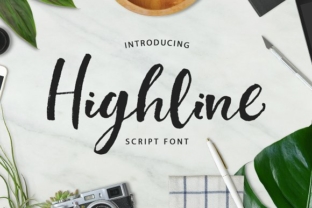
Highline is a handcrafted display font that carries a refined, contemporary feel. Unlike generic system fonts, it brings a human touch to digital and print work. The letterforms are carefully drawn, with subtle variations that give text a natural rhythm without sacrificing readability. This is not a font designed for long body copy in a report. It excels in headlines, logos, signage, packaging, hero sections, and any space where you want to draw attention with warmth and personality.
For professionals managing multiple projects, the appeal is practical: one well-chosen font can reduce the number of visual elements you need to juggle. Highline works as a focal point. It anchors a design direction early so that the rest of the layout follows naturally. When you are planning a brand identity, a campaign visual, or even a personal project like a portfolio or invitation, starting with a strong typeface like Highline streamlines decisions about color, spacing, and imagery.
Where Highline Fits in a Broader Process
Typography decisions happen at different stages depending on your workflow. Some people choose fonts during the planning phase, others during execution, and a few at the very end to polish a nearly finished design. Highline is flexible enough to work in any of these scenarios, but its real strength emerges when you use it early.
Using Highline Before a Project Begins
Before you open a design tool or write a single word of copy, you can use Highline to define the visual direction. This is especially helpful for branding projects, product launches, or content campaigns. Instead of sketching abstract ideas, select Highline as a style anchor. Its handcrafted nature signals approachability and quality. That indication influences decisions about supporting fonts, color palettes, and imagery before you invest time in detailed layouts.
For example, a small business owner planning a new e-commerce store can start by testing Highline in a brand mockup. If the font aligns with the desired tone, it becomes the reference point for everything else. This approach reduces the back-and-forth that often happens when typography is an afterthought.
Integrating Highline During Active Work
When you are in the middle of a project, Highline can serve as a unifying element across different deliverables. Suppose you are building a set of social media templates, a landing page, and a printed brochure. Using Highline for headings and key callouts creates visual consistency without requiring every asset to look identical. This is particularly useful for marketers and content creators who need to maintain brand recognition across platforms with different constraints.
Highline also interacts well with other tools in your workflow. If you use design software like Adobe Illustrator, Figma, or Canva, you can install the font and use it directly. For web projects, you can embed it via CSS. The handcrafted letterforms hold up well at larger sizes, so they work in responsive layouts where headings scale across devices. When paired with a clean sans-serif for body text, the contrast is both readable and visually interesting.
Using Highline After the Core Work Is Done
Even if you have already completed a design, Highline can act as a refinishing element. This is common in iterative workflows where final polish matters. A blogger might have a header image that feels flat. Swapping the headline font to Highline adds texture and personality with minimal effort. A freelancer packaging a portfolio can use Highline for section titles to give the work a cohesive, professional finish. In these cases, the font functions as a quality-control tool, elevating assets that are structurally sound but visually neutral.
Practical Implementation Tips
Integrating Highline into your routine does not require a major overhaul. However, a few practical considerations can help you use it more effectively.
Preparation and Compatibility
Before downloading, check that Highline includes the character set you need. Most handcrafted fonts cover standard Latin characters, but if your work requires extended glyphs, diacritics, or special punctuation, verify compatibility early. This prevents surprises when you are mid-project. Creativeqube provides clear documentation, so a quick review saves time.
Also consider file formats. If you work across different operating systems or software versions, ensure you have OTF or TTF files that install cleanly. For web use, check for WOFF or WOFF2 versions that load efficiently. Testing Highline in your primary tools ahead of a deadline avoids last-minute compatibility issues.
Usability Guidelines
Because Highline is a display font, it reads best at larger sizes. Use it for headlines, subheads, pull quotes, and short emphasis text rather than for paragraphs. A good rule of thumb is 24 points or larger in print, and equivalent CSS sizes for web. At smaller sizes, the handcrafted details can become distracting or hard to read. Pair it with a neutral, highly readable body font such as a simple sans-serif or a classic serif depending on your tone.
- Pair intentionally. Highline works well with geometric sans-serifs like Open Sans or Montserrat for a clean contrast. For a more traditional feel, pair it with a sturdy serif like Merriweather.
- Mind spacing. Handcrafted fonts sometimes need manual letter-spacing adjustments. In display settings, a slight increase in tracking can improve readability, especially in all-caps usage.
- Limit the palette. Use Highline in one or two sizes within a project. Too many variations dilute its impact. Let it lead rather than compete.
How Highline Interacts with Other Resources and Decisions
Typography does not exist in isolation. Highline interacts with your broader toolkit, including color, layout, imagery, and even the tone of your copy. A handcrafted font carries a certain warmth, so it pairs naturally with photography that feels candid or editorial. It also works well with illustration, letterpress-style visuals, or minimalistic layouts where the type itself becomes the hero.
For entrepreneurs and small business owners, this means Highline can reduce the need for expensive custom illustration or photography. A strong headline in Highline can carry a design that would otherwise require more visual elements. This efficiency matters when you are working with limited time or budget.
On the decision side, choosing Highline often signals a shift in brand perception. If you have been using standard system fonts, switching to a handcrafted typeface communicates that you care about detail. For freelancers and creators, this can be a subtle but effective trust signal to clients and audiences. It suggests that you invest in quality tools and craftsmanship.
Workflow Examples for Different Roles
To make this more concrete, here are a few scenarios showing how Highline integrates into real work.
For a Marketer Building a Campaign Landing Page
Start by selecting Highline for the main heading and key value propositions. Keep the rest of the text in a light, clean sans-serif. The contrast draws attention to the core message. Test the page on mobile to ensure the heading remains readable at smaller breakpoints. With Highline, you can often reduce the amount of decorative imagery, letting the typography do the work.
For a Freelancer Designing a Client Presentation
Use Highline for section titles and the client name on the cover slide. This lends a handcrafted feel without making the deck feel informal. Pair with simple charts and plenty of white space. The font signals care and attention, which helps build confidence with clients reviewing your deliverables.
For a Hobbyist Creating a Personal Brand
Whether it is a logo, a YouTube banner, or a stationery set, Highline can anchor your visual identity. Build around one or two consistent colors. Let the font be the recognizable element. Because it is handcrafted, it gives your brand a unique feel even if you rely on template-based tools.
For a Publisher or Blogger Designing Article Headers
Instead of using the same system font for every title, reserve Highline for feature articles or series headers. This creates a visual hierarchy that signals importance to readers. It also adds editorial polish without requiring custom graphics for each post.
Long-Term Considerations and Quality Control
When you add a font to your workflow, you are making a long-term investment. Highline holds up well in repeated use because its handcrafted nature does not feel gimmicky. It works across contexts, from digital to print, and from professional to personal. However, it is worth reviewing how the font performs over time.
Check that licensing covers your intended use. Creativeqube offers clear terms, so review them for commercial use, embedding, and distribution rights. If you are using Highline for multiple clients or in products for sale, confirm that your license aligns with those scenarios. This is a standard part of asset management for anyone serious about design quality.
Also consider file organization. Store Highline alongside other paid fonts in a dedicated folder or font management app. This makes future projects easier and prevents license confusion. Good asset management pays off when you revisit a project months later and need to recreate files consistently.
Useful Observations for Smooth Integration
One observation worth noting: Highline works well in pairings where the supporting font is simple and restrained. This is true for most handcrafted typefaces. The goal is balance. Let Highline be the expressive element while everything else recedes. This applies not only to fonts but to layout, color, and imagery.
Another practical note is to test Highline early in your process, even if you are not sure it will be the final choice. Download a trial version if available, drop it into a few mockups, and see how it interacts with your content. This low-stakes testing saves hours of rework later.
Finally, remember that a font is a tool, not a solution. Highline is well-crafted and versatile, but it works best when paired with clear objectives and thoughtful composition. Use it to support your message, not replace it.
Bringing It All Together
Highline from Creativeqube offers a practical way to introduce craft and consistency into your projects without adding complexity. Whether you use it at the start to set a direction, during active work to unify assets, or at the end to add polish, it fits naturally into existing workflows. For professionals, creators, and entrepreneurs alike, it is a tool that respects your time while elevating your output.
Typography is seldom the loudest part of a project, but it is often the most persistent. Choosing a handcrafted font like Highline is a decision that pays attention across every touchpoint. When you prioritize quality in the details, the results speak for themselves.