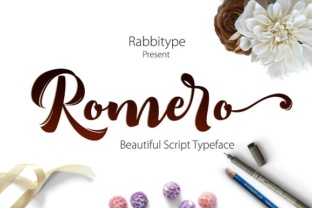
Romero: A Fresh Script Font Built for Real-World Creativity
When you first encounter Romero, it doesn't shout for attention. Instead, it draws you in with a natural, hand-crafted rhythm that feels both personal and professional. Designed as a fresh script font with an extensive set of extras and alternates, Romero sits at the intersection of elegance and utility. But what exactly makes a script font worth your time, and how does Romero fit into the everyday projects of creators, business owners, and online users? Let's step beyond the marketing gloss and explore what this typeface actually offers.
In a world where digital communication often feels sterile, script fonts like Romero bring back a sense of human touch. They mimic the flow of handwriting while maintaining the consistency needed for professional work. This balance is harder to achieve than most people realize. Many script fonts either lean too far into decorative territory—becoming illegible at small sizes—or they strip away personality in favor of cold precision. Romero attempts to walk the middle path, and for the most part, it succeeds.
What Romero Actually Brings to the Table
Let's start with the basics. Romero is not a single, static font file. It is a typeface family that includes a rich set of stylistic alternates, swashes, ligatures, and contextual choices. This means you are not stuck with a default look. Instead, you have the freedom to customize each letterform to suit the mood of your project. For designers, this is like having a toolbox rather than a single hammer.
The core characteristics of Romero include:
- Natural flow: The letterforms connect with a smooth, organic rhythm that mimics real handwriting without looking messy.
- Generous alternates: You get multiple versions of many letters, allowing you to avoid repetition and create a more authentic hand-lettered feel.
- Swashes and flourishes: These are not just decorative extras; they can be used to add emphasis to key words or initials without overwhelming the text.
- Contextual ligatures: Certain letter pairs automatically adjust to create better visual connections, improving readability.
- Multilingual support: It covers a wide range of Latin-based languages, making it suitable for international audiences.
These features might sound technical, but in practice, they translate into something simple: Romero gives you more control over how your text looks and feels. Whether you are designing a wedding invitation, a social media graphic, or a brand logo, the ability to tweak individual letters can make the difference between a generic result and something that feels custom-made.
Who Benefits Most from Romero?
While Romero is versatile, it is not a one-size-fits-all solution. Understanding who gains the most value from it helps you decide whether it aligns with your needs.
Designers and Creatives
If you work in graphic design, branding, or illustration, Romero offers the flexibility to experiment. The alternates and swashes let you create unique wordmarks, headlines, and accent text without starting from scratch. For instance, when designing a logo for a boutique coffee shop, you can use the standard letters for the main name and then add a flourished initial for a touch of personality. The ability to toggle between different glyphs means every project can feel distinct even if you use the same font family.
Small Business Owners and Entrepreneurs
Not everyone has the budget to hire a professional designer. If you are running a small business and handling your own marketing materials, Romero can elevate your visuals with minimal effort. A handwritten-style font on a product label or a promotional flyer adds warmth and approachability. Customers often subconsciously associate hand-lettered text with care and authenticity. Using Romero on your website headers or social media posts can help your brand feel more human without requiring advanced design skills.
Event Planners and Content Creators
Wedding invitations, save-the-date cards, and event programs are natural fits for script fonts. Romero shines in these contexts because it offers both readability and charm. For content creators—whether on YouTube, Instagram, or a personal blog—using a distinctive script font for titles or quotes can help establish a recognizable visual identity. The extras and alternates give you room to create variations across different posts while maintaining a cohesive look.
Online Users and Hobbyists
Even if you are not a professional, Romero can add a personal touch to digital projects like greeting cards, photo captions, or DIY invitations. The learning curve is low: most design software (including free tools like Canva) supports OpenType features, so you can access the alternates without any advanced knowledge.
Where Romero Excels: Real-World Scenarios
To understand the practical value of Romero, let's walk through a few concrete examples.
Scenario 1: A Handcrafted Brand Identity
Imagine you are launching a small line of organic skincare products. You want the packaging to feel natural, artisanal, and trustworthy. Using Romero for the product names and key ingredients gives each bottle a hand-labeled appearance. The alternates let you vary the letterforms across different scents or variants, so each product feels unique while still belonging to the same family. The swashes can be reserved for the brand name on the front label, drawing the eye without clutter.
Scenario 2: A Wedding Invitation Suite
Wedding invitations need to balance elegance with clarity. Romero works well for the couple's names and the main event details, while the alternates with longer ascenders or decorative tails can highlight special elements like the date or venue. Because the font remains legible even at smaller sizes (unlike some overly ornate scripts), you can use it for RSVP cards and direction inserts without sacrificing readability.
Scenario 3: Social Media Consistency
A lifestyle blogger or influencer might use Romero for quote graphics, story titles, and pinned post headers. The contextual ligatures ensure that the same word looks slightly different each time it appears, which keeps the feed from feeling repetitive. This organic variation is exactly what makes script fonts appealing for personal branding—it suggests a human hand behind the content.
Strengths and Considerations: An Honest Look
No font is perfect for every situation. Here is a balanced view of what Romero does well and where you might need to be careful.
Strengths
- Versatility within a script style: The alternates and extras give you a range of looks from casual to formal without switching fonts.
- Good readability for a script font: Letterforms are distinct enough that even longer passages remain legible at moderate sizes.
- Well-crafted ligatures: They feel natural rather than forced, which is a common issue with script fonts that have too many automatic substitutions.
- Broad software compatibility: Works in most major design applications (Adobe Suite, Affinity, Canva, Procreate, etc.) and supports OpenType features.
Considerations
- Not ideal for body text: Like most script fonts, Romero is best suited for headlines, short phrases, and accent text. Using it for long paragraphs will strain the reader's eyes.
- Requires some design awareness: To get the most out of the alternates, you need to know how to access OpenType features in your software. This is not difficult, but it is an extra step.
- May not suit ultra-formal or corporate contexts: If your brand voice is strictly professional or minimalist, a script font—even a refined one like Romero—might feel out of place.
- Licensing considerations: Always check the license terms for commercial use. Some foundries restrict usage for certain types of projects.
How to Evaluate Whether Romero Fits Your Project
Rather than asking "Is this a good font?" ask "Is this font a good fit for my project?" Here is a practical framework to help you decide.
- Define the tone you want to convey: Is it warm and approachable? Elegant and refined? Playful and creative? Romero leans toward the elegant-casual spectrum, so if your goal is raw edge or industrial minimalism, it might not align.
- Consider the medium: Will this be used primarily in print, on screens, or both? Test Romero at the actual sizes you plan to use. Script fonts can look very different at 12pt versus 72pt.
- Think about consistency vs. variety: If you need a single, repeatable look (like a logo), the standard letters may be enough. If you want to create multiple assets that feel connected but not identical, the alternates become invaluable.
- Test with real content: Download a trial version or use a web-based preview tool. Type in your actual brand name, tagline, or key phrases. See how the ligatures and alternates interact with your specific words.
- Ask for feedback: Show a few variations to someone who represents your target audience. Ask them how the text makes them feel—not about the font itself, but about the message.
Practical Expectations When Using Romero
Once you decide to use Romero, there are a few practical things to keep in mind.
Installation and setup is straightforward. Most downloads include both the font files and a guide to accessing alternates. If you are using Adobe Illustrator or InDesign, open the Glyphs panel to manually select alternate characters. In Canva, you can often find the alternates under the "Stylistic Sets" or "Contextual Alternates" option. Spending ten minutes exploring these features will pay off in the quality of your output.
Pairing with other fonts is an important skill. Romero works well with clean sans-serif fonts (like Lato, Montserrat, or Open Sans) for body text or supporting details. Avoid pairing it with another script font, as this can create visual confusion. A good rule of thumb is to use Romero for the hero text and a simple, neutral font for everything else.
File formats matter. Ensure you download the full package including .otf or .ttf files with OpenType features. Some simplified versions may strip out the alternates, which defeats the purpose of choosing Romero in the first place.
Final Thoughts: Romero as a Tool, Not a Shortcut
At the end of the day, Romero is a tool. A beautiful, well-crafted tool, but a tool nonetheless. The extras and alternates give you flexibility, but the quality of your design still depends on your choices—how you pair it, where you place it, and what you say with it. The best font in the world cannot rescue poor layout or unclear messaging.
What Romero does offer is a way to add a human touch to your work without sacrificing professionalism. For designers, business owners, creators, and anyone who communicates visually, it provides a palette of options that can make your text feel less like a machine produced it and more like a person wrote it. And in a digital landscape that often feels impersonal, that is a valuable thing.
If you are looking for a script font that balances charm with utility, Romero deserves a place in your toolkit. Try it on a small project first. Play with the alternates. See how it feels with your voice. You may find that it becomes a go-to for projects where you want to connect with your audience on a more personal level.
After all, the best designs don't just communicate a message—they communicate a feeling. And Romero gives you the words to do both.