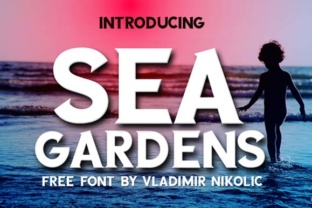
Sea Gardens: A Legible Serif Font That Works Where Others Don’t
Typography decisions often come down to a trade-off between personality and readability. You want something that stands out, but not at the cost of making your reader work harder than they should. That’s where Sea Gardens enters the picture. Created by type designer Vladimir Nikolic, this serif font manages to be both distinctive and highly legible, which is a rarer combination than you might expect. Even better, it’s available for free, making it an accessible option for anyone who needs reliable type without a licensing budget.
What Makes Sea Gardens Different
At first glance, Sea Gardens looks like a classic serif face, but spend a little time with it and you’ll notice deliberate design choices that set it apart. Nikolic has given the font a generous x-height, which means lowercase letters are proportionally taller relative to the capitals. That alone improves readability at smaller sizes, especially on screens where pixel density can make delicate serifs blur together.
The letterforms themselves are open and airy. Counters—the enclosed spaces inside letters like o, e, and a—are wide enough that even at 14 or 16 pixels, they don’t collapse into dark blobs. This matters more than most people realize. When you’re reading a long article, a newsletter, or a product page, those small spatial cues are what keep your eyes moving smoothly from one word to the next.
Another notable quality is the way Nikolic handled the serifs themselves. They’re bracketed and moderate in weight, which gives the font a warm, approachable feel without tipping into overly decorative territory. You get the anchoring effect of a serif—the horizontal flow that guides the eye—but without the stiffness that sometimes makes traditional book faces feel dated.
A Free Font That Doesn’t Feel Compromised
Let’s address the elephant in the room. Free fonts often come with limitations: missing glyphs, poor hinting, uneven spacing. Sea Gardens doesn’t suffer from those problems. It includes a solid character set covering standard Latin punctuation, numerals, and accented letters commonly used in European languages. The kerning pairs are well-tuned enough that you won’t see awkward gaps between letters like To or Va. For a free release, the polish is surprising.
That said, it’s not a sprawling type family. You won’t find multiple weights, italics, or opentype features like stylistic alternates or small caps. What you get is a single weight—regular—that works as a text face for body copy and, with careful sizing, can pull double duty in short headlines. Knowing this going in helps you use it effectively rather than wishing it were something else.
Practical Applications Across Different Workflows
The real test of any typeface is whether it makes your day-to-day work easier or your communication clearer. Here’s where Sea Gardens shines across several common contexts.
Blogging and Online Publishing
If you run a content site, readability is your currency. Readers who struggle to parse your text will bounce, and they won’t come back. Sea Gardens works well for long-form articles because its generous spacing and open counters reduce eye strain over extended reading sessions. I’ve tested it at 18px line height on a standard blog layout, and it holds up even with dense paragraphs. Pair it with a simple sans-serif for headings—something clean like Inter or Work Sans—and you’ll have a typographic system that feels intentional without being distracting.
One practical recommendation: use Sea Gardens for the body text of tutorial posts, case studies, or editorial content where credibility matters. The serif formality cues readers to take the material seriously, while the legibility keeps them engaged.
Professional Documents and Reports
In a corporate environment, font choices send signals. Sea Gardens strikes a balance that works for internal memos, white papers, and client-facing reports. It’s formal enough to look professional but approachable enough that it doesn’t come across as stiff or old-fashioned. If you’ve been defaulting to Times New Roman or Georgia because they’re safe, try Sea Gardens instead. You’ll get similar readability with a fresher appearance.
For business owners and freelancers putting together proposals or pitch decks, this font can be a subtle differentiator. It shows you care about the details without shouting about it.
Educational Materials
Teachers, trainers, and course creators need type that works for different reading levels. Sea Gardens’ clear letterforms reduce confusion between similar characters like lowercase l and uppercase I, or the numeral 1 and lowercase l. That might sound minor, but in worksheets, study guides, or slide handouts, those distinctions reduce friction for learners. The font’s even texture also helps when you’re printing on standard office paper, where fine details can get lost.
Digital Products and UI Elements
While serifs aren’t the default choice for user interfaces, there are specific spots where Sea Gardens fits naturally. Think longer-form in-app content like help articles, onboarding copy, or terms of service pages that users actually need to read. In these contexts, the legibility benefits outweigh the conventional wisdom that says interfaces should always use sans-serif.
For creators building digital products—notion templates, Canva presentations, or ebook layouts—Sea Gardens gives you a free, high-quality option that doesn’t require a subscription or commercial license. That’s a genuine advantage when you’re trying to keep overhead low.
Usability Considerations You Should Know
No font is perfect for every situation, and being honest about Sea Gardens’ limits will help you use it better.
- Weight availability. With only one weight, you can’t create strong hierarchy through bold or light variations. Plan your layout so headings and body copy differ by size, color, or typeface pairing rather than weight.
- Screen performance at very small sizes. Below 12px, the serifs start to degrade, especially on low-resolution displays. Stick to 14px or above for body text, and consider a sans-serif companion for captions or footnotes.
- Print works well but test first. If you’re using it for printed materials, run a test page before committing. The open letterforms that help on screens can feel slightly light when printed on certain papers or at small point sizes.
- Language support. It covers most Western European languages but doesn’t include Cyrillic, Greek, or extended Latin. Verify your character set if your audience uses non-standard diacritics.
Pairing Suggestions for a Cohesive Look
Because Sea Gardens is a single-weight serif, pairing it thoughtfully expands your typographic range. A clean, neutral sans-serif keeps the overall palette balanced. I’ve had good results using it with Open Sans for subheadings and UI labels, and with Merriweather Sans for a slightly warmer contrast. Avoid pairing it with another detailed serif—the page will feel cluttered and the hierarchy will blur.
If you’re working on a branding project, consider using Sea Gardens as your primary text face and a geometric sans like Montserrat for display purposes. The contrast between the serif’s traditional roots and the sans-serif’s modern geometry gives a contemporary but grounded feel.
Why It Deserves a Place in Your Toolbox
Free fonts often get overlooked because people assume paid equals better. Sea Gardens challenges that assumption. Vladimir Nikolic has delivered a typeface that does exactly what a good text serif should: it stays out of the way while making the reading experience smoother. For entrepreneurs on a budget, educators building resources, or freelancers managing their own brand, this font represents a genuinely useful resource.
It’s also worth downloading simply to have a reliable option in your back pocket. You never know when you’ll be working on a project that calls for a serif but doesn’t have budget room for licensing. Having Sea Gardens ready to go means you won’t have to compromise on quality when the situation arises.
Give it a try on your next project—whether that’s a newsletter, a short ebook, or a client report. You might find that Nikolic’s design instincts solve problems you didn’t even realize your current typeface was creating.